

Download USB Oblivion – USB, registry, erase, privacy, security, utility, Windows, erase USB traces, remove USB history
Overview
USB Oblivion is a specialized utility designed for 64-bit Windows systems, focusing on the secure erasure of all traces related to USB-connected drives and CD-ROMs from the Windows registry. Its primary purpose is to enhance user privacy and data security by eliminating digital footprints that could potentially be exploited by unauthorized parties. The application addresses a critical gap in system hygiene—residual registry entries that may reveal past device usage, even after physical removal of storage devices. This makes it particularly valuable for users in high-security environments, such as corporate IT departments, government agencies, or individuals handling sensitive personal data.
Target users include system administrators, privacy-conscious individuals, and anyone who frequently connects external storage devices to their Windows machines. The tool is especially useful in shared or public computing environments where maintaining a clean system footprint is essential. By removing registry entries associated with removable media, USB Oblivion helps prevent forensic analysis or unauthorized tracking of device history.
Developed by Jason A. Bilbrey, the application reflects a focused, no-frills approach to digital privacy. Although the developer did not provide additional technical details about their background or prior projects, the tool’s design suggests a deep understanding of Windows registry mechanics and security best practices. In the broader app ecosystem, USB Oblivion fills a niche role as a lightweight, purpose-built utility, offering targeted functionality without bloat or unnecessary features.
Key Features & Functionality
- Thorough Erasure of USB and CD-ROM Traces – The core function of USB Oblivion is to scan and remove all registry keys linked to previously connected USB drives and CD-ROMs. This includes device identifiers, drive letters, and timestamps, ensuring that no trace remains after device removal.
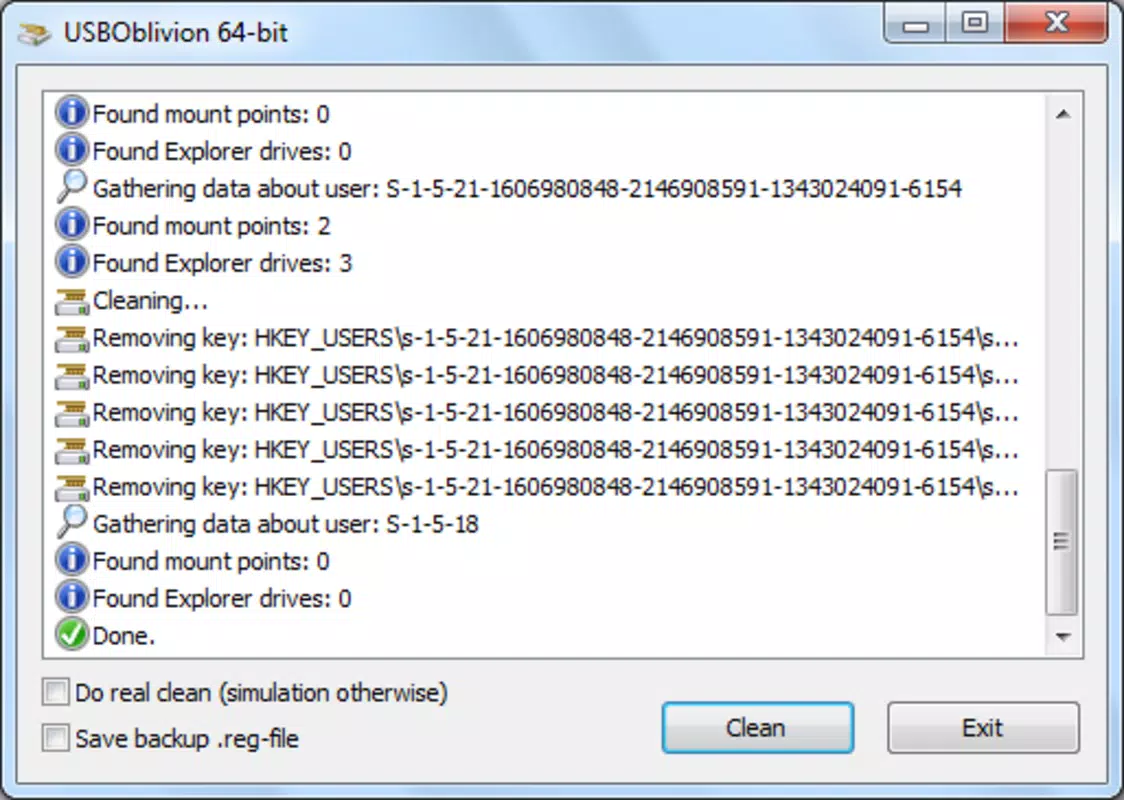
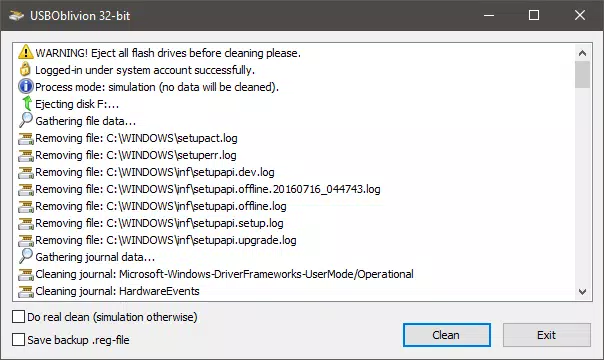
- Test Mode of Operation – Before executing any changes, users can activate test mode to view a detailed preview of the registry entries that will be deleted. This allows for verification and informed decision-making, reducing the risk of unintended consequences.
- Backup and Undo Functionality – The application automatically generates a .reg file containing a complete backup of the registry state prior to changes. This file can be used to restore the original configuration at any time, offering a safety net for users concerned about system stability.
- Fully Automatic Mode – For users seeking a hands-off experience, the tool supports automatic execution. Once enabled, USB Oblivion performs the erasure process without requiring user input, streamlining the workflow for routine maintenance.
- User-Friendly Interface – The interface is designed with simplicity in mind, featuring clear buttons, status indicators, and straightforward navigation. Even users with limited technical knowledge can operate the tool effectively, minimizing the learning curve.
Real-world use cases include preparing a computer for resale, securing a workstation in a shared office, or ensuring compliance with data protection policies. For example, a corporate IT team might use USB Oblivion as part of a standard system cleanup before deploying machines to new employees.
Interface, UX & Performance
USB Oblivion presents a clean, minimalistic interface that prioritizes clarity and ease of use. The layout is centered around a single main window with clearly labeled buttons for key actions: Scan, Test, Erase, and Restore. Navigation is intuitive, requiring minimal interaction to achieve desired outcomes. Visual feedback is provided through progress indicators and status messages, helping users understand the current state of operations.
Performance is optimized for speed and efficiency. The tool operates directly on the registry, leveraging Windows' native APIs to perform scans and deletions swiftly. Although the developer did not list formal performance metrics, the application’s small file size of 1.3 MB suggests a lightweight footprint that does not strain system resources. It runs smoothly on a variety of Windows 64-bit systems, from entry-level laptops to high-end workstations.
Responsiveness is consistent across device categories, with no reported lag or freeze during execution. Stability is maintained through the use of backup files and test mode, reducing the likelihood of system issues. The application does not require administrative privileges to run, though it may prompt for them during actual registry modifications, which is standard behavior for such tools.
Platform Compatibility & Technical Requirements
USB Oblivion is designed exclusively for 64-bit Windows operating systems. The application is compatible with Windows 10 and later versions, though specific OS requirements were not listed by the developer. It is distributed as a standalone executable with a file size of 1.3 MB, making it easy to download and install without consuming significant disk space.
The developer did not specify minimum system requirements, such as RAM or processor type. However, given the tool’s lightweight nature and direct registry interaction, it is expected to function on most modern Windows machines. Compatibility with older Windows versions was not confirmed, and no information was provided about support for ARM-based devices or alternative platforms.
Pros and Cons
Pros
- Lightweight and fast, with a minimal file size of 1.3 MB.
- Provides a test mode for safe preview of registry changes.
- Includes a backup .reg file for easy restoration of settings.
- Offers fully automatic mode for hands-off operation.
- User-friendly interface suitable for non-technical users.
Cons
- Only available for 64-bit Windows systems.
- Developer did not disclose detailed system requirements.
- Not compatible with macOS or Linux platforms.
- Does not support real-time monitoring of USB connections.
- No built-in update checker or automatic version notification.
FAQ
Is USB Oblivion safe to use?
Yes, the application is designed with safety in mind. It includes a test mode and automatic backup of registry settings, allowing users to review changes and revert if needed.
Can I undo the changes made by USB Oblivion?
Yes. The tool generates a .reg file that can be used to restore the original registry state at any time, ensuring that no irreversible modifications are made.
Does USB Oblivion require admin rights?
While the application may run without elevated privileges, it will prompt for administrative access when performing registry modifications, which is standard for such utilities.
Is USB Oblivion free to download and use?
Yes, the tool is available at no cost. There are no in-app purchases or subscription models.
Can I use USB Oblivion on older versions of Windows?
Compatibility with Windows versions prior to 10 was not confirmed. The application is designed for 64-bit systems, but specific OS requirements were not listed by the developer.
Final Thoughts
USB Oblivion stands out as a focused, reliable utility for users seeking to enhance their digital privacy on Windows systems. Its ability to erase USB and CD-ROM traces from the registry with precision and safety makes it a valuable addition to any security-conscious user’s toolkit. The inclusion of test mode, backup functionality, and an intuitive interface ensures that both novice and experienced users can benefit from its capabilities.
While it is limited to 64-bit Windows and lacks cross-platform support, its targeted design and free availability make it an excellent choice for individuals and organizations concerned about data privacy. For anyone who connects external devices regularly—whether for work, personal use, or system maintenance—this tool offers peace of mind through transparency and control.
Download USB Oblivion now


